
How to Share Tweets to Instagram Story on iOS
Twitter first started testing this feature at the end of 2020. The company, however, has only recently enabled the ability to share a tweet on Instagram Story for all iOS users.
With that out of the way, let’s get into the step-by-step guide on how you can directly share a tweet from Twitter to your Instagram Stories. Follow the steps below.
- First, open the Twitter app on your iOS device.
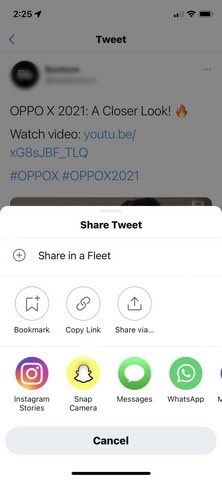
- Select a tweet that you want to share on your IG Story and tap the “Share” icon.

- Once the iOS share sheet opens up, select the “Instagram Stories” option.
- Following this, you will be redirected to the Instagram app, and a new IG Story draft will open up on your iPhone. The tweet will appear as a movable, resizable sticker for your Instagram Story. You can now also add text, stickers, and all the jazz to give your story a facelift.
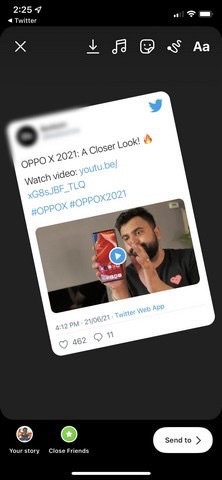
- Then, tap the “Your Story” button at the bottom-left corner to share the tweet on your IG Stories.
By following the steps above, you can share a tweet directly from Twitter to Instagram Stories with ease on your iPhone. However, the tweet in Stories will appear as a non-interactive image. It is not linked to the original tweet. You cannot tap on the tweet to open the tweet in the Twitter app, and that’s a little disappointing. Moreover, do keep in mind that you cannot add a protected tweet on your Instagram Story.
How to Share Tweets to Instagram Story on Android
As for the process of sharing tweets on Instagram Stories using an Android device, you will, unfortunately, need to rely on workarounds for the time being. The direct share option is not available on Twitter for Android as of now. Hence, users still need to use tweet screenshots until Twitter rolls out the IG Stories integration on its Android app.